Digital Save the Date
Announce your wedding date months before the invitation goes out. Pick an animated design, add your names, the date and where guests should be, and share one link on WhatsApp, Telegram or email. Guests open it, watch the date reveal itself, and add it to their calendar in a tap. One payment, no subscription.
What a digital save the date is
A save the date is the first thing guests receive: your names, the date and roughly where the wedding will be, sent early enough that people can hold the day and book travel. It is not the invitation — the venue details, dress code, schedule and reply form come later.
A digital one is a short animated page at its own web address, instead of a card in the post. Occavia’s Save the Date is built for exactly that job: one screen, one reveal, one calendar button, nothing that belongs on the real invitation.
How it works
Pick one of three animated designs
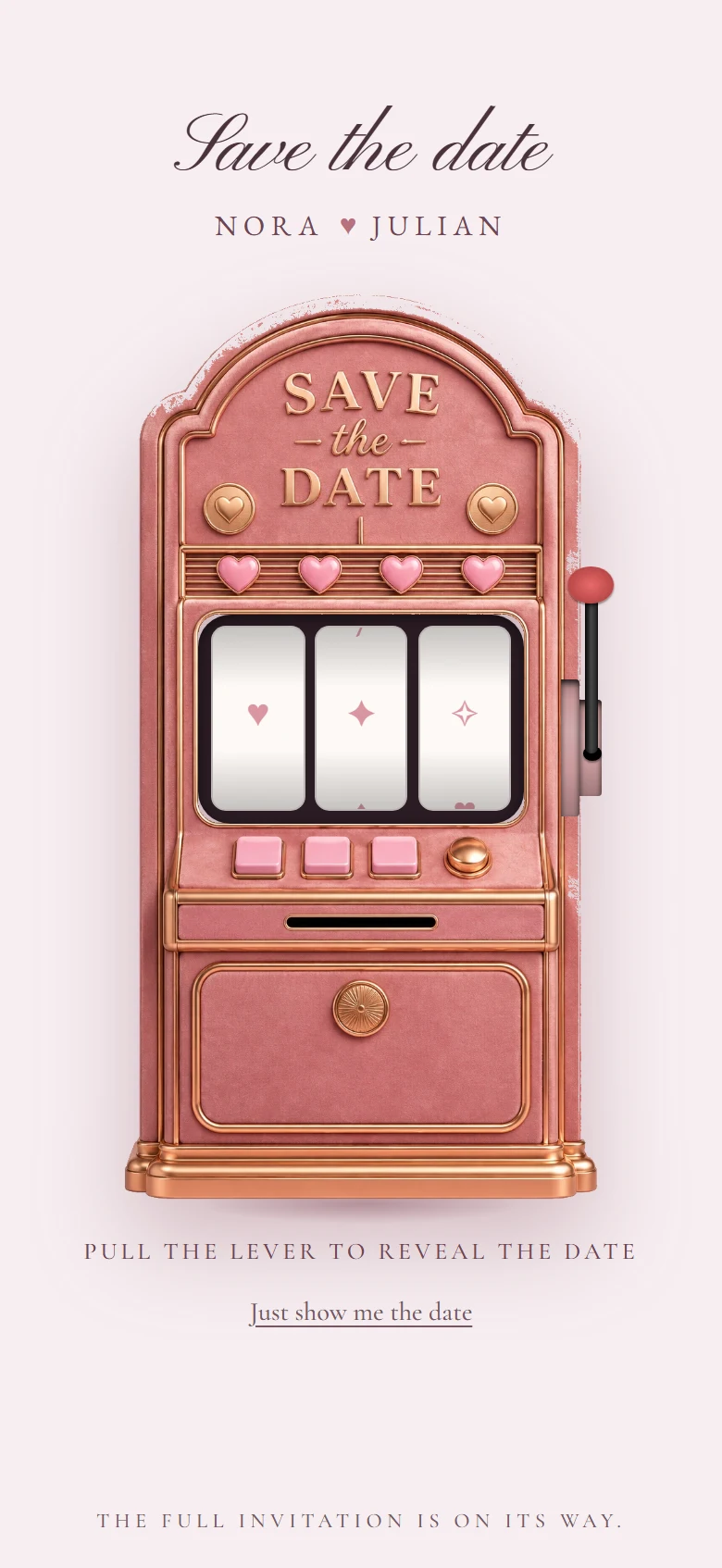
Jackpot, Departures or Golden Heart. Each is a reveal: the guest pulls the lever, watches the board settle or scratches the gold foil, and the date appears.
Add your names, the date and a travel line
A short form, in one language. The travel line is optional — a city and “book early” is enough for a destination wedding.
Preview, then pay once to publish
You see the finished page before you pay. Checkout happens on the page, and your save the date goes live automatically the moment payment clears.
Share one link
Copy your link from the dashboard and send it however you already talk to your guests. Nobody installs anything or creates an account.
The designs
Three animated save the date designs, each a different way of revealing the date. Every one is a live page you can open right now.
What your guests see
An animated reveal
The page opens on the design, not on a wall of text. The date appears through the animation — reels landing, a board flipping, foil scratched away.
Your names, the date and the place
Written out in full under the reveal, plus your travel line if you added one. Jackpot and Golden Heart also count down to the day.
One tap to their calendar
A single add-to-calendar button downloads the date for Apple, Google or Outlook calendars. That is the whole ask of a save the date, so it is the only button.
No app, no account, no login
It is a normal web link. It opens inside WhatsApp or Telegram, on any phone, and it is kept out of search engines.
Who it is for
Destination weddings
When guests need flights and hotels, they need the date a year out. Send the save the date now and the full invitation when the plans are firm.
Long lead times
Booked the venue eighteen months ahead? Lock in the date with your guests before life fills their calendars.
Guests spread across countries
One link reaches everyone at once, in whatever app they already use, with no postage and nothing to get lost.
Couples who want the invitation to stay special
Announce the date simply now; keep the venue, the schedule and the reply form for the invitation itself.
What you can change after sharing
Your details, any time
Names, date, travel line — edit them from your dashboard and the page updates in place. The link never changes, so nothing you sent goes stale.
Collect guest emails
Switch on an email field so guests can ask to receive the invitation later. On Golden Heart it appears once the date is revealed.
Point it at your invitation
When your full invitation is published, link it from the dashboard. On Golden Heart, guests who come back find a button straight to it.
One free design edit by our team
Want something adjusted that the editor does not cover? One request is included.
Save the Date or the full Wedding Invitation?
They are two different products at two different prices, and most couples end up sending both. The Save the Date announces the day. The Wedding Invitation is where guests reply.
| What you get | Save the Date | Wedding Invitation |
|---|---|---|
| Animated design and one shareable link | Yes | Yes |
| Names, date and a travel line | Yes | Yes |
| Add-to-calendar for guests | Yes | Yes |
| Reply form and live guest list | No | Yes |
| Venue, schedule, story and other sections | No | Yes |
| Guest photo wall, guestbook and QR poster | No | Yes |
| Languages | One | Up to three |
| Free design edits by our team | One | Three |
Before you send it
Questions couples ask
When should we send a save the date?
Six to eight months before the wedding is the usual window, and earlier for a destination wedding or a date near a holiday. The invitation itself follows closer to the day.
Do guests need an app or an account?
No. Your save the date is an ordinary web link. It opens in any browser, including inside WhatsApp and Telegram, with nothing to install and nothing to sign up for.
Can guests RSVP on the save the date?
No, by design. A save the date asks guests to hold the day, not to commit — the reply form belongs on the full Wedding Invitation, which is a separate product.
Can I change the date or details after I have shared the link?
Yes. Edit from your dashboard and the same link shows the new details. One design edit by our team is also included.
Is the price really one-time?
Yes. You pay once when you publish. There is no subscription, no per-guest fee and nothing to renew. The page stays online for as long as your account is active.
How many languages can it be in?
One. The Save the Date is a single-language announcement. If your guests need several languages, the full Wedding Invitation can be published in up to three.
What if I change my mind after buying?
You can request a refund within 14 days, provided your save the date has not been delivered. Because a save the date has no reply form, publishing it counts as delivery — so preview carefully before you pay.
Does the save the date turn into the invitation later?
No — the Wedding Invitation is bought separately when you are ready. You can then link the two from your dashboard so guests who return to your save the date can find the invitation.
In their words
Stories worth remembering.
Real moments. Beautiful experiences.
We knew the date long before we knew anything else, so we sent that first and kept the rest for later.